Monthly Budget Planner – KDP
Understanding the Monthly Budget Planner – KDP
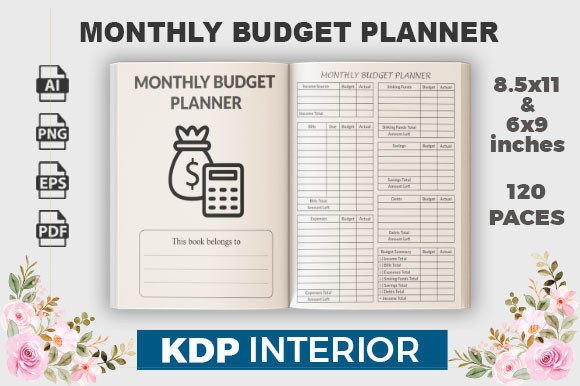
If you’ve ever struggled to keep track of where your money goes each month, a structured tool can make all the difference. The Monthly Budget Planner – KDP is exactly that: a thoughtfully designed interior template that helps you organize income, expenses, savings, and even passwords in one convenient place. It comes as a complete package with editable source files (Ai and EPS), high-resolution PDFs, JPG, and PNG formats, plus 120 pages ready for print. Whether you’re a freelancer juggling multiple income streams or a small business owner trying to separate personal and professional finances, this planner offers a clear, no‑clutter approach to monthly money management.
What sets this product apart is its dual functionality. Alongside the budget pages, it includes a password tracker – a practical addition for anyone who needs to store login details for banking, subscriptions, or work accounts. The combination of financial planning and password management in one book saves time and reduces the risk of losing critical information.
Who Benefits from This Budget Planner?
The Monthly Budget Planner – KDP is designed for a wide audience. Beginners just starting to take control of their finances will appreciate the straightforward layout. There are no complicated spreadsheets or confusing categories – just clean, easy‑to‑fill pages that prompt you to list your income, fixed expenses (rent, utilities, insurance), variable costs (groceries, entertainment), and savings goals.
Freelancers and gig workers often face irregular income, making budgeting tricky. With this planner, you can track multiple paychecks or project payments month by month, and use the password section to store client portal logins or tax account details. Entrepreneurs and small business owners can use the budget pages for personal finances while keeping business passwords separate but accessible in the same book.
Bloggers, marketers, and educators who create content about personal finance or productivity may find this template useful for their own organization – or as a design product for their audience. The print‑ready files are tested with Amazon KDP, making it easy to publish your own version of this planner.
Key Features That Add Real Value
Let’s look at what you actually receive and why each component matters.
- Editable source files (Ai and EPS): You can customize every element – change colors, add your logo, adjust categories, or translate the text. This is ideal if you want to brand the planner for your business or adapt it to different currencies.
- High‑resolution PDF, JPG, and PNG files: Need to print a single page quickly? The JPG and PNG formats let you do that. The PDF is print‑ready at 300 dpi, CMYK color mode, ensuring sharp text and vibrant colors when you use a commercial printer or home office.
- 120 pages of content: That’s enough for a full year of monthly budgets plus several password tracker pages. The length offers plenty of room without feeling overwhelming.
- Two size options: 6x9 inches and 8.5x11 inches: Choose the compact version for a portable planner or the letter size for more writing space. Both work perfectly with Amazon KDP. No bleed means you don’t have to worry about trimming or margins – the design is already optimized for print.
- Password tracker integrated: Each budget month can be paired with a password page, or you can dedicate a section at the back for all your logins. The tracker includes fields for website, username, password, and notes.
Practical Use Cases in Real Life
Imagine you’re a freelance graphic designer. You have three main clients, each paying at different dates. Using the Monthly Budget Planner – KDP, you list all expected payments under “Income,” then allocate funds to rent, software subscriptions, freelance taxes, and personal savings. The password section lets you store your client portal logins, tax filing website credentials, and social media accounts – all in the same book you use for budgeting. No more sticky notes or scattered digital files.
For a family managing household expenses, this planner works just as well. One person can track grocery spending, utility bills, and kids’ activities while also keeping passwords for online banking, streaming services, and school portals. Because the pages are undated, you can start any month and reuse the book as needed.
Small business owners can use the 8.5x11 inch version to create a detailed monthly budget for their company. The password tracker helps secure access to accounting software, e‑commerce platforms, and email accounts. Since the files are editable, you can add additional sections like “Business Expenses” or “Receipts” without hassle.
Things to Consider Before Using or Publishing This Planner
Before you jump in, a few practical points can help you get the most out of the Monthly Budget Planner – KDP.
- Understand your needs: If you prefer digital budgeting apps, this physical planner might feel unnecessary. But for those who benefit from writing things down, the tactile experience often leads to better retention and commitment.
- Check the format: The files are no‑bleed, which means the design fits within standard trim sizes. If you plan to print at home, make sure your printer settings match the selected size (6x9 or 8.5x11). For Amazon KDP, simply upload the print‑ready PDF – it’s tested and should pass their review.
- Customization effort: The Ai and EPS files require vector editing software like Adobe Illustrator or Affinity Designer. If you’re not familiar with these tools, you may need to learn basic editing or hire someone. Alternatively, you can use the PDF as‑is – it’s ready to print without any changes.
- Password security: While a physical tracker is convenient, remember that anyone with access to the book can see your passwords. Use it in a safe environment and consider adding codes or abbreviations for sensitive accounts.
- One product, many possibilities: If you enjoy this planner, the creator offers other KDP interiors. Don’t hesitate to explore their store for habit trackers, meal planners, or gratitude journals – the same quality standards apply.
Why This Planner Stands Out for Creators
For those looking to publish content on Amazon or sell printables, the Monthly Budget Planner – KDP is a ready‑to‑use resource. The files are professionally tested, so you can focus on marketing rather than design troubleshooting. The inclusion of a password tracker adds a unique selling point that many budget planners lack. It’s a small feature that solves a real problem: remembering dozens of logins without relying on vulnerable digital storage.
The resolution – 300 dpi in CMYK – ensures high‑quality prints whether you use a laser printer or a professional print shop. And because the template is vector‑based, you can resize elements without losing sharpness. This flexibility is especially useful if you want to create a custom version for a specific audience, such as a budget planner for photographers or a password‑tracking planner for remote workers.
Getting Started with Your Own Planner
Once you download the files, you have several paths. You can:
- Print the PDF directly and start using it immediately.
- Edit the Ai or EPS file to add your personal categories or branding.
- Upload the print‑ready PDF to Amazon KDP for listing as a paperback.
- Use individual pages (JPG/PNG) for digital planners or bullet journal inserts.
The password tracker can be placed at the beginning, end, or distributed throughout. Some users prefer one page per month; others compile all passwords in the last few pages. There is no wrong way – adapt it to your workflow.
Final Thoughts on the Monthly Budget Planner – KDP
A good planner doesn’t just help you track numbers – it supports your goals and reduces mental clutter. The Monthly Budget Planner – KDP does this by combining essential financial planning with a practical password tracker in a well‑designed, print‑ready package. Whether you’re a beginner finding your footing, a creative professional managing variable income, or a small business owner staying organized, this template offers a solid foundation. And if you decide to publish it as your own product, the tested files give you confidence that the technical details are taken care of.
Explore the possibilities, customize as needed, and remember that consistent use is what turns a simple planner into a powerful tool. Visit the creator’s store for more designs – the same attention to quality awaits in every product.