Daily Goodnotes Planner for Better Habits
Keeping track of daily habits can feel like a chore. You try sticky notes, random notebooks, or to-do apps, but nothing sticks. The Daily Goodnotes Planner offers a different approach—one that blends thoughtful design with practical functionality. Whether you are a freelancer juggling multiple projects or a business owner mapping out quarterly goals, this planner aims to support real progress without the complexity.
At its core, this is a personal organizer designed to help you monitor and maintain good habits. It is not about cramming every hour of your day into rigid slots. Instead, it focuses on what matters most: the routines and actions that move you forward. The layout is clean, minimal, and intentionally uncluttered—so you spend less time fiddling with formatting and more time actually planning.
What Makes This Planner Different
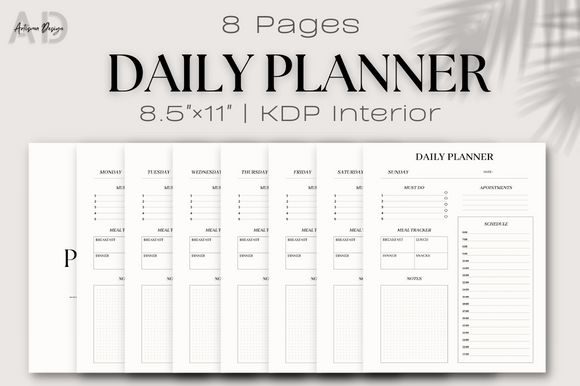
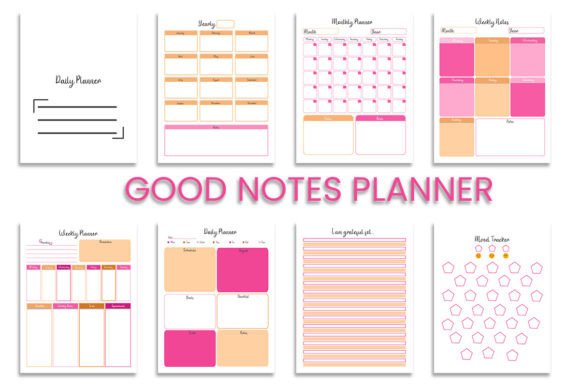
The Daily Goodnotes Planner stands out because it is built for digital use while remaining print-friendly. You receive AI files, PDF files, and SVG files, all in high resolution (300 DPI) with CMYK color. That means you can use it on your iPad with Goodnotes or Notability, or print it out at home or a local shop. The 8-page structure covers a full week, giving you enough room to reflect without overwhelming you.
Each page is thoughtfully composed. The layout uses a minimalist aesthetic—soft colors, clear lines, and ample white space. This is not a flamboyant design meant to distract. It is a tool for clarity. You can customize it further with the SVG files, adding your own branding, logos, or color schemes if you are a creator or small business owner.
Another strength lies in the color profile. CMYK ensures that if you print, the colors come out true to screen. Many digital planners look great on a tablet but turn muddy on paper. This one avoids that pitfall. At 300 DPI, text and lines stay crisp, even if you zoom in or print at larger sizes.
Real Applications Across Different Roles
This planner is not a one-size-fits-all product, but it adapts well to several contexts. Here are some practical ways people are using it:
For Professionals and Entrepreneurs
If you manage a team or run a business, your daily habits often determine your long-term success. Use the Daily Goodnotes Planner to track one key habit each day—like reviewing your top three priorities before checking email, or doing a 10-minute end-of-day review. The minimalist layout helps you stay focused without distraction. You can also use it during client meetings as a digital notebook, then export PDF pages to share action items.
- Track progress on quarterly OKRs with a simple daily habit check
- Log networking touches or follow-ups so you never lose a connection
- Use the SVG files to add your company logo for a consistent brand experience
For Creatives and Freelancers
Freelancers often juggle multiple clients and projects. The planner helps you establish a daily creative ritual—like sketching for 15 minutes, writing 500 words, or reviewing your portfolio. Because the layout is minimal, it works well as a companion to more detailed project management tools like Notion or Trello. You get a quick daily snapshot of your creative output without the overhead.
- Open the PDF on your tablet each morning
- Write down one creative habit you want to practice
- Check it off at the end of the day
- Review your weekly pattern to see what days you are most productive
For Educators and Bloggers
Teachers and content creators need to stay consistent with lesson planning or publishing schedules. The planner can serve as a content calendar in miniature—tracking daily writing, research, or outreach habits. The high-resolution files also mean you can incorporate the planner into digital products you sell, such as a habit tracker bundle or a printable journal for students.
For Personal Growth and Hobbyists
Maybe you are working on a personal goal like reading more, meditating, or exercising. The planner gives you a structured but flexible space to record minor wins. Over time, looking back at a week of checked habits builds momentum. The 8-page cycle keeps you from feeling like you are repeating the same layout endlessly—each week feels fresh.
Practical Benefits You Can Expect
People often ask, “Does a simple habit tracker really make a difference?” The answer is yes, if you use it consistently. Here is what the Daily Goodnotes Planner does well:
- Reduces friction: You open a clean page and write one thing. No complex setup, no learning curve.
- Encourages reflection: Because the design is minimal, you naturally pause and think about what matters today.
- Supports multiple workflows: You can use it as a standalone tool or alongside other apps. The SVG and PDF formats give you flexibility.
- Looks professional: Whether you share it with a coach, a client, or a colleague, the design holds up. It communicates that you are organized.
- Works offline: Print the pages and you have a paper backup. No battery, no distractions.
What to Consider Before Using It
No tool is perfect for everyone. The Daily Goodnotes Planner assumes you want a daily habit focus rather than a minute-by-minute schedule. If you need hourly time blocking, this might feel too loose. However, you can always use it as a supplement to a more detailed calendar.
Another consideration is the file format. You get AI, PDF, and SVG files. If you are not familiar with vector editing software like Adobe Illustrator, the AI and SVG files might feel intimidating at first. But the PDF is ready to use immediately on any tablet or print. Most people will just open the PDF and start writing.
Also, the 8-page count means you get a week’s worth of pages. If you plan to use it long-term, you will need to duplicate the pages in Goodnotes or print multiple copies. That is straightforward, but worth noting so you are not surprised halfway through the month.
Recommendations for Getting the Most Out of It
If you decide to try the Daily Goodnotes Planner, here are a few practices that seasoned users find helpful:
- Pick one habit per day. Do not overload the page. The strength of this planner is focus. Choose a single behavior that moves the needle and track it daily.
- Use the SVG files for branding. If you are a coach or content creator, customize the planner with your logo and colors. Then offer it as a freebie to your audience.
- Review once a week. After finishing the 8 pages, take 10 minutes to audit your progress. Which days did you follow through? What patterns emerge? Adjust your habit choice accordingly.
- Pair it with a longer-term goal setting tool. This planner is excellent for daily execution, but you still need a quarterly or yearly vision. Use it as the tactical layer beneath your broader plan.
- Print a few copies for brainstorming. Sometimes digital feels too clean. Print a page, grab a pen, and scribble freely. The high-resolution print quality makes it satisfying to work with on paper.
Final Thoughts on Daily Goodnotes Planner
In a world full of complicated productivity systems, the Daily Goodnotes Planner offers a return to simplicity. It does not promise to fix your entire workflow. It just gives you a clean, beautiful space to track the habits that matter. Whether you are a busy parent, a startup founder, or a teacher looking for a better way to stay organized, this planner meets you where you are.
The combination of AI, PDF, and SVG files with high-resolution CMYK color means you get both digital flexibility and print quality. You can use it exactly as designed or adapt it to your own style. That kind of versatility is rare in a habit planner.
If you have been searching for a structure that encourages consistency without feeling restrictive, this might be the right fit. Start with one week, track one habit, and see how it feels. Often, that small step is enough to build real momentum.