Red Roses Notebook Cover KDP Bundle: A Practical Resource for Self-Publishers
Creating a professional notebook cover that stands out in Amazon’s Kindle Direct Publishing marketplace requires more than a good idea. It demands consistent formatting, clean design, and assets that translate well across digital previews and print. The Red Roses Notebook Cover KDP Bundle offers a focused solution for publishers who need a cohesive, visually appealing cover package without starting from scratch. This article examines what the bundle includes, how it performs in real-world publishing workflows, and who stands to benefit most from incorporating it into their product lineup.
What the Red Roses Notebook Cover KDP Bundle Includes
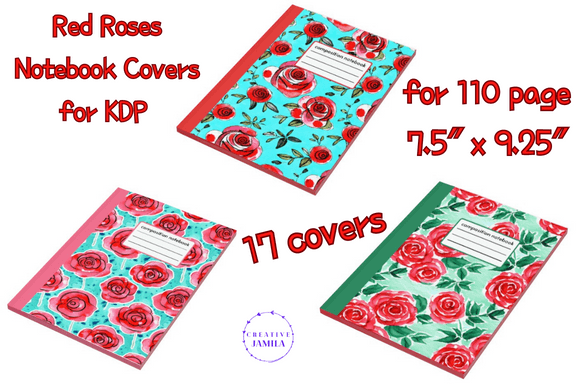
This bundle is built around a single rose-themed design, provided in multiple formats to accommodate different stages of the publishing process. The zip file contains editable Canva templates, 18 PNG files, and a PDF print version. All assets are formatted for both front and back cover placement, and the dimensions are tailored for a 110-page notebook sized at 7.5″ x 9.25″. The overall cover size measures 15.498″ x 9.5″, which accounts for the spine width typical of that page count.
The inclusion of editable Canva templates is worth noting. Canva’s browser-based editor lowers the barrier for publishers who may not have access to Adobe Creative Suite or who prefer a faster, template-driven workflow. Being able to adjust text, swap backgrounds, or tweak color overlays directly in Canva saves time and reduces the need for external design help. The 18 PNG files provide ready-to-export options, while the PDF print version ensures compatibility with print-on-demand services that prefer PDF uploads.
Strengths of the Bundle for KDP Publishers
One of the strongest aspects of this bundle is its attention to formatting. Many notebook cover templates on the market provide only a front cover image, leaving the publisher to guess at spine width or back cover alignment. Here, the dimensions are explicitly set for a 110-page notebook with a 7.5″ x 9.25″ trim size. That level of specificity reduces the risk of upload errors, misaligned covers, or rejected files during KDP review.
The rose motif itself is versatile. Red roses carry associations with romance, passion, elegance, and even gothic or vintage aesthetics depending on how the design is styled. This means the same template can be adapted for journals, gratitude diaries, wedding planners, or self-care notebooks. Publishers who want to test multiple niches can reuse the .d and adjust the typography and background to suit different audiences without redesigning the layout.
Another practical strength is the inclusion of 18 separate PNG files. Having multiple color variations, overlay options, or layout tweaks pre-exported gives publishers flexibility when creating series or matching products. For example, one PNG might work well for a lined journal while another suits a dot-grid planner, all under the same thematic umbrella.
Usability and Workflow Integration
For someone already familiar with Canva, the editable templates are straightforward to use. Opening the template, replacing placeholder text, and exporting as a print-ready PDF can be completed in under an hour. The learning curve is minimal even for beginners, since Canva’s interface is intuitive and widely documented.
However, users should verify that the Canva template layers are organized cleanly. Some bundle creators group elements in ways that make editing cumbersome. In this case, the bundle appears to follow standard Canva template conventions, with text and background elements separated logically. If you plan to customize heavily—such as changing the rose image or adding your own logo—check that the templates are not overly flattened before purchase.
The PDF print version is particularly useful for publishers who prefer a fixed, non-editable file that is ready to upload. KDP accepts PDF as the preferred format for book interiors and covers, so having a print-ready PDF eliminates the need to convert from PNG or JPG. The fact that the bundle provides both editable and fixed formats means you can choose your preferred workflow without additional tools.
Quality and Presentation Considerations
Design quality in any KDP bundle depends on resolution, color depth, and composition. The PNG files at the sizes provided are suitable for print at 300 DPI, which is the standard KDP requires. The red rose imagery appears to be rendered with enough detail that it will reproduce well in both color and grayscale previews. That matters because many KDP customers browse on mobile devices, where cover clarity strongly influences click-through rates.
The color palette built around red roses tends to photograph well on Amazon’s product listing pages. Red is a high-contrast color that draws attention in thumbnail views, which can help a notebook stand out among competitors using pastel or neutral covers. At the same time, red can be polarizing. Publishers targeting minimalist or professional audiences may need to pair the cover with understated interior formatting or use Canva’s editing tools to mute the saturation slightly.
One limitation to note is that the bundle is designed specifically for a 7.5″ x 9.25″ trim size with 110 pages. If you publish notebooks in other dimensions—such as 6″ x 9″ or 8.5″ x 11″—or with significantly different page counts, the spine width will not match. You would need to manually adjust the template in Canva or use an alternate tool to resize the layout, which adds extra steps. For publishers who stick to this specific trim size, the bundle offers a precise fit.
Who Benefits Most from This Bundle
Self-publishers who produce journals, planners, or notebooks in the mid-size range will find this bundle most immediately useful. If you regularly publish 7.5″ x 9.25″ notebooks with around 110 pages, the formatting is essentially plug-and-play. Entrepreneurs launching a line of rose-themed products—such as wedding guest books, gratitude journals, or garden planners—can also build a cohesive brand identity around the same cover design used across multiple titles.
Freelancers and content creators who design notebooks for clients will appreciate the editable Canva templates. You can quickly produce mockups for client approval, make changes on the fly, and deliver final files without needing advanced design software. This makes the bundle a practical asset for service-based businesses where turnaround time matters.
Marketers and small business owners who sell physical notebooks as promotional items or branded merchandise can also use the bundle. The rose design has broad appeal, and the ability to add custom text or a company logo inside Canva means the cover can be adapted for corporate gifts, event giveaways, or retail displays without requiring a graphic designer on staff.
Practical Recommendations for Getting the Most Out of the Bundle
Start by opening the Canva template and reviewing all layers before making any changes. Familiarize yourself with the structure so you know which elements are locked and which are editable. If you plan to use multiple PNG files across a series, rename each file clearly to avoid confusion during upload.
Test the PDF print version on KDP’s cover preview tool before publishing. Even with properly formatted dimensions, rendering issues can sometimes occur with gradients or shadow effects. Previewing in the KDP interface will catch any problems before the book goes live.
Consider creating multiple variations of the same template by adjusting the background color or replacing the rose image with a different floral element in Canva. This allows you to build a small collection of notebooks that feel connected without being identical. The bundle gives you a solid foundation for that kind of series development, especially if you publish regularly and want to maintain a consistent aesthetic across your catalog.
If you publish notebooks in other trim sizes, keep the bundle as a reference for layout structure. You can duplicate the Canva template, resize the canvas, and manually adjust the spine width and margins. It will require more effort than using a size-specific bundle, but the design assets themselves remain usable.
Limitations to Keep in Mind
The bundle’s specificity—while a strength—also means it will not suit every project. Publishers working with 200+ page notebooks or unusual trim sizes may need to modify the dimensions. The design is also fixed around the red rose theme, so if your niche requires neutral, monochrome, or abstract covers, you will need additional resources.
Another consideration is that the bundle provides no interior formatting. The cover is ready to go, but you will still need to create or source interior pages for the notebook itself. This is standard for cover-only bundles, but worth noting if you expected an all-in-one solution.
Finally, because the Canva templates are editable, the quality of your final output depends partly on your own design decisions. Changing fonts, colors, or image placement can affect the overall look. If you are new to Canva, stick to minor adjustments until you are comfortable with the tool’s capabilities.
Final Observations on Long-Term Value
The Red Roses Notebook Cover KDP Bundle provides a practical, well-formatted asset for publishers who produce notebooks in the 7.5″ x 9.25″ size range. Its combination of editable templates, ready-to-use PNGs, and a print-ready PDF covers the typical workflow from design to upload. The rose theme offers broad niche appeal, and the formatting precision reduces the friction of KDP submission.
For self-publishers, freelancers, and small business owners who need a reliable cover package they can customize quickly, this bundle delivers usable value without requiring advanced design skills. It is not a one-size-fits-all solution, but within its intended dimensions and theme, it performs exactly as expected. If the red rose aesthetic aligns with your product line and publishing goals, this bundle is worth adding to your toolkit. For those who prefer more neutral or minimalist covers, it may serve better as a reference for formatting standards than as a primary design resource. Either way, the bundle demonstrates the kind of thoughtful preparation that saves time and reduces errors in the KDP publishing process.