My First Letters Tracing Book for KDP: A Practical Guide to Creating a Sellable Alphabet Tracing Resource
If you are building a collection of low-content or medium-content books for Amazon KDP, an alphabet tracing book is one of the most consistent niches. My First Letters Tracing Book for KDP is a digital printable resource designed for children, kindergarten students, and early learners, but its real value lies in how it fits into your publishing workflow. This article breaks down what this product includes, how to integrate it into your KDP process, and practical steps to use the files efficiently from preparation to upload.
What the Tracing Book Package Includes and Why It Matters for Your Workflow
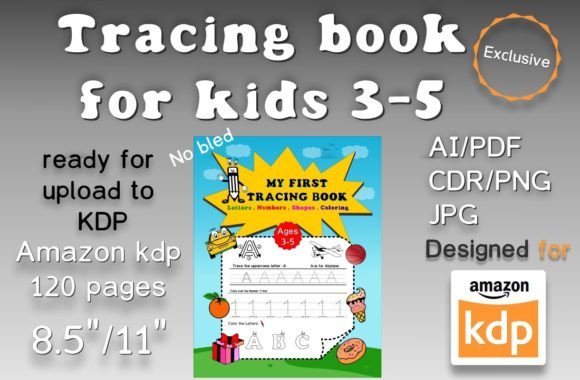
The package provides a complete set of files for both the book cover and the interior. You receive editable source files in AI and CDR formats, PDF files for both cover and interior, 120 high-resolution PNG pages, 120 high-resolution JPG pages, and a ready-to-upload PDF that has been tested on KDP. You also get a fonts list and a description file for your Amazon listing.
Having multiple file formats means you can work in the design software you are most comfortable with. If you use Adobe Illustrator, the AI files are ready. If you prefer CorelDRAW, the CDR files give you that flexibility. The 300 DPI resolution and 8.5 x 11-inch sheet size with no bleed are standard for KDP print books, so you can skip resizing or adjusting bleed settings. This consistency saves time during preparation and reduces errors at upload.
The 120 pages cover the full alphabet, likely with multiple practice pages per letter, which provides enough content for a substantial workbook. For a kindergarten tracing book, that page count positions it as a solid product for parents and teachers looking for comprehensive practice.
How the Editable Source Files Fit into a Customization Workflow
One of the biggest advantages of having AI and CDR source files is the ability to personalize the interior. If you are creating a series of tracing books with different themes, you can modify the cover design, change the font style, or adjust the layout without starting from scratch. This editing capability is especially useful when you want to brand your books with a consistent look across a product line.
For example, you might keep the same tracing page structure but swap the cover illustration to match a seasonal theme or a specific character style. The editable files let you reuse the interior layout repeatedly, saving hours of redesign work. You can also adjust the difficulty level by modifying letter size or adding directional arrows if the original file supports those layers.
If you are a beginner with design software, the PDF and image files give you a fallback option. You can still upload the PDF directly to KDP without any editing. The package is designed so you can choose your workflow based on your skill level and the time you want to invest.
Using the Tracing Book Before, During, and After Publishing
The term "before" here refers to the preparation stage before you upload to KDP. During the preparation, you should review each file for completeness. Because the files have been tested on KDP, you can trust that the dimensions and format meet Amazon's requirements. But you should still check that all 120 pages are included and that the PDF bookmarks (if any) work correctly. Testing a few print pages on your own printer can confirm that the tracing lines are clear and the letter shapes are appropriate for young children.
During the upload process, the no-bleed 8.5 x 11-inch PDF will fit the standard KDP trim size for paperback. The absence of bleed simplifies the upload because you do not need to extend background colors to the edges. This also reduces the chance of content being cut off. The 300 DPI ensures the text and images remain sharp in print.
After publishing, you can use the description file and fonts list to create your Amazon listing copy. The description file likely contains prewritten bullet points and product details that you can adapt. Having this ready saves you from writing copy from scratch and helps maintain consistency with the keywords you want to target. The fonts list is useful if you ever need to replace a missing font or if you want to use the same typeface for other products.
Interacting with Other KDP Tools and Assets
This tracing book package works well with common KDP workflow tools. For instance, you can combine these interior pages with a separate cover design file you create in Canva or Photoshop. The provided cover PDF gives you a starting point, but you can also design a new cover using the same dimensions. The interior PDF is ready to merge with any cover file using Amazon’s cover creator or an external PDF editor.
If you use KDP’s paperback preview tool, the no-bleed PDF will display correctly without warnings. The 300 DPI quality ensures that the preview looks crisp, which can positively affect customer impressions. Because the file has been tested, you are less likely to encounter errors during the review stage, which speeds up the approval time.
For sellers who manage multiple books, this tracing book can be part of a larger educational series. You could create a “My First Letters” series that includes tracing, coloring, and writing practice books. The same interior layout can be adapted for uppercase letters, lowercase letters, or combined sets. The editable source files make that expansion straightforward.
Practical Implementation Tips for Smooth Integration
When you first open the files, create a dedicated folder on your computer for this project. Inside, organise subfolders for covers, interiors, source files, and final uploads. Keeping the AI and CDR files separate from the JPEGs and PNGs prevents confusion. Rename the files with a consistent naming convention, such as “BookTitle_Interior_Page001.jpg”, to make it easier to locate specific pages later.
If you plan to edit the interior, start with the AI file. Make a backup copy before making any changes. If you accidentally delete a layer or modify a letter, you can revert to the backup. Work in layers so that you can adjust the background, the letter outlines, and the tracing dots independently. This structure helps maintain clean edits.
For the cover, you may want to update the title or author name. The source files likely have editable text layers. If you are unfamiliar with the software, there are free tutorials online for basic text editing in Illustrator or CorelDRAW. Changing just the title and adding your own brand logo can give the book a professional look without needing advanced design skills.
When you are ready to upload, use the provided tested PDF as your primary file. Verify the page count in the KDP uploader matches 120. Double-check that the file is under the size limit for KDP (usually no problem for text-heavy interiors). If you need to compress the PDF without losing quality, use tools like Adobe Acrobat’s “Reduce File Size” preset for high-quality print.
Ensuring Consistency and Quality Across Multiple Uses
If you plan to sell this tracing book on KDP long-term, consistency in quality and formatting is important. Because the files come pre-tested, your first upload is likely smooth. However, if you later update the interior with corrections or new pages, keep the same file structure. Maintain 300 DPI and no bleed for any new pages you create. Use the same fonts from the included fonts list to avoid mismatched typography.
Creating a style guide for your educational books can also help. Note the exact trim size, resolution, and font names used. Then, when you produce other books, you can match those specs. This approach builds a recognizable brand across your catalog.
For quality control, print a test copy of the interior on a home printer or order a paperback proof from KDP. Check that the tracing lines are not too thin or too thick. Ask a child or parent to test the book and give feedback on letter spacing and clarity. Real user feedback helps you improve subsequent editions.
Preparing Your Amazon Listing with the Provided Description File
The package includes a description file for Amazon KDP. Use this as a template rather than copying it verbatim. Read through the bullet points and adjust them to highlight the specific benefits that resonate with your target audience. For instance, emphasize the 120 practice pages, the large 8.5x11 size, and the fact that it works for both classroom and home use. Incorporate relevant keywords naturally, such as “alphabet tracing workbook”, “preschool letter practice”, and “handwriting readiness for kindergarten”.
You can also add your own selling points, like mention of the tested KDP compatibility or that the book uses clear, kid-friendly fonts. The description file saves you the effort of writing from a blank page, but personalizing it helps your listing stand out.
When you upload the book, the keywords you use in the backend should match the search terms likely used by parents, teachers, and homeschoolers. Think of phrases like “letter tracing book for kids”, “preschool workbook ages 3-5”, “alphabet handwriting practice”, and “KDP low content book”. The description file may already include some of these, so you can fill the keyword fields accordingly.
Long-Term Use and Maintenance of the File Set
This tracing book resource is not a one-time asset. The source files allow you to create variations for different markets. You could adjust the language for non-English alphabets (if the file structure supports it), change the cover for different age groups, or repurpose the interior for a cursive tracing book later. Keeping the original files safe and organized means you can revisit them months or years later without having to recreate the content.
If you plan to sell on multiple print-on-demand platforms, the same files can be adapted for those platforms’ requirements. Always check the trim specifications as they may differ from KDP. The 300 DPI and no-bleed setup work well for most, but some platforms require bleed, so you may need to add a bleed margin from the editable files.
Finally, back up your files to at least two locations, such as your hard drive and a cloud service. Losing the source files means losing the ability to edit quickly. Protecting your digital assets ensures you can maintain your product line with minimal disruption.
Summing Up the Workflow Value
My First Letters Tracing Book for KDP is more than just a printable. It is a complete starter kit for anyone entering the KDP educational niche. The tested files reduce the technical friction of uploading, the editable formats give you creative control, and the included description file cuts down listing prep time. By understanding how these pieces fit together—preparation, customization, upload, and subsequent updates—you can use this resource efficiently to build a reliable income stream from alphabet tracing books. Focus on practical steps, maintain consistency, and leverage the provided assets to streamline your publishing process from idea to sale.