Recipe Book Template KDP Interior 8: A Practical Guide to Choosing the Right Layout for Your Cookbook
Creating a cookbook for Amazon KDP involves more than gathering great recipes. The interior layout determines how readers interact with your content, how professional the book feels, and whether buyers leave positive reviews. The Recipe Book Template KDP Interior 8 is one of several layout options available, but understanding what it offers and where it fits best requires a closer look at its structure, limitations, and ideal use cases.
What the Recipe Book Template KDP Interior 8 Actually Includes
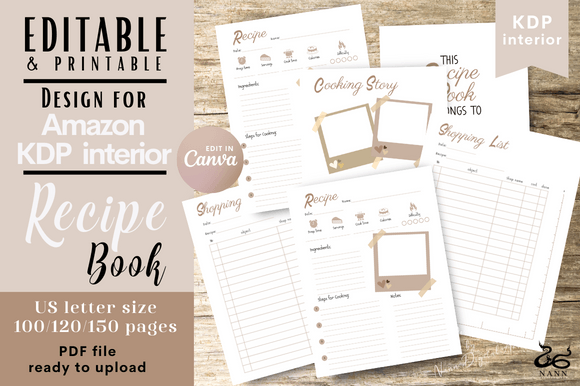
This template is designed specifically for Amazon KDP uploads and comes as a bleed PDF in the standard 8.5×11 inch trim size. You receive three PDF files for 100, 120, and 150 pages, plus a Canva editable link. The specification details matter because they directly affect how your content fits on the page and how the final printed book looks.
The template includes several page types that go beyond a simple recipe list. There is a Belongs To page at the beginning, which adds a personal touch. Recipe pages feature fields for Date, Prep Time, Cook Time, Serves, Difficulty Level, Ingredients, Step for cooking, and Notes. There are also dedicated Cooking Story pages and Shopping List pages.
What makes this template distinct is the combination of structured recipe data with narrative space. Many templates offer only ingredient-and-instruction layouts. The inclusion of Cooking Story pages suggests the designer intended the template for authors who want to add context, memory, or personality around each dish. That is a meaningful difference if you are weighing layout options.
Comparing Formats: Bleed PDF vs. No-Bleed Options
The specification states clearly that this is a bleed PDF only. Bleed means that background colors, images, or design elements extend to the edge of the page, giving a polished, professional finish. If your cookbook includes full-page photos, colored backgrounds, or decorative borders that reach the edge, a bleed file is the correct choice.
However, if your content is text-heavy with minimal graphics, a no-bleed template might save you design time and reduce file size. No-bleed layouts keep all content within safe margins, which can simplify editing in tools like Canva or Word. The tradeoff is that the book will have white margins on all sides. For a clean, minimalist cookbook, that may work perfectly. For a more visually immersive experience, bleed is preferable.
Your decision should depend on the visual style you want. If you envision a cookbook with vibrant full-page recipe photos or colored headers that bleed off the page, the Recipe Book Template KDP Interior 8 supports that without requiring extra formatting steps.
Page Count Options and Their Practical Implications
Having three page count choices—100, 120, and 150 pages—gives flexibility, but each comes with tradeoffs. A 100-page template means you have roughly 50 sheets of paper. If each recipe occupies a full spread, you can accommodate around 40 to 45 recipes plus front and back matter. That is suitable for a focused collection, such as a dessert-only cookbook or a seasonal recipe roundup.
The 150-page version allows roughly 65 to 70 recipes with the same layout density. That range works well for comprehensive cookbooks that cover multiple categories, like appetizers, mains, sides, and desserts. The risk with more pages is that you might dilute quality or include filler to meet the page count. Readers notice when recipes feel repetitive or when pages are padded with oversized images that add no real value.
Consider your actual content inventory before choosing. If you have 50 strong recipes and a few personal stories, the 120-page option often hits a sweet spot—enough room for substantial content without feeling sparse or stretched.
Strengths of the Structured Recipe Page Layout
The template includes dedicated fields for prep time, cook time, servings, and difficulty level. This level of structure helps readers quickly assess whether a recipe fits their schedule and skill level. For a KDP cookbook, this directly influences usability and reviews. Buyers often mention in feedback when a recipe layout is easy to follow versus cluttered or missing key details.
Having a Notes section on each recipe page is another practical feature. Experienced home cooks appreciate space to write substitutions, personal tips, or serving suggestions. While this may seem minor, it can differentiate your book from competitors that only offer bare-bones recipe layouts.
The Shopping List pages are a convenience feature that some template buyers overlook. If your cookbook targets busy parents or meal prep enthusiasts, having dedicated list pages adds real-world utility. Readers can tear out or photocopy those pages, which increases engagement with your book.
Limitations to Consider Before Buying
No template is perfect for every project, and this one has constraints worth examining. The page dimensions are fixed at 8.5×11 inches, which is standard for US letter size. That is ideal for Amazon KDP, but if you are considering print-on-demand platforms outside Amazon or international markets, you might need a different trim size. Some authors prefer 6×9 or 7×10 for a more compact cookbook that fits kitchen countertops. 8.5×11 is larger and more suited for coffee table style cookbooks or those with large text for older readers.
The template is a bleed PDF, which means any non-bleed elements must be carefully placed within safe zones. If you are new to book formatting, bleed files require attention to margins. The Canva link helps, but Canva’s PDF export settings must be configured correctly to avoid white slivers along edges. This is not a flaw of the template itself, but it is a practical consideration if you are unfamiliar with print-ready file setup.
Another tradeoff is that the template includes fixed fields. If your recipes require unusual categories—such as dietary tags, allergen info, or fermentation times—you may need to adapt the structure manually. The template works best for conventional recipe categories. Specialized cookbooks, such as those focused on fermentation, pressure cooking, or baking with alternative flours, might need additional fields that the template does not provide out of the box.
Who Should Choose This Template
The Recipe Book Template KDP Interior 8 fits well for authors who:
- Want a clean, structured layout that covers essential recipe data without overcomplicating the design.
- Plan to include personal stories or cooking memories alongside recipes, taking advantage of the Cooking Story pages.
- Prefer a larger trim size (8.5×11) for readability or visual impact.
- Have a recipe count that aligns with the 100–150 page range, typically 35 to 70 recipes depending on density.
- Are comfortable with bleed PDF formatting or willing to learn Canva basics to adjust colors and text.
If you are creating a family recipe collection, a community cookbook, or a themed book that mixes stories with standard recipes, the extra narrative pages offer a natural home for that content. The Belongs To page also makes it suitable for personalized gifts or branded keepsakes.
When You Might Need a Different Template
There are scenarios where this template may not be the best fit. If your cookbook focuses heavily on instructional techniques, step-by-step photo guides, or specialized diagrams, the fixed recipe fields might feel restrictive. Some templates offer more flexible, modular layouts with space for multiple images per page or custom callout boxes.
If you are on a tight budget and plan to format entirely in free software like Google Docs, the Canva link helps, but Canva’s free tier has limitations on export resolution and design assets. A simpler text-based template might be easier to manage if you want to avoid a design learning curve.
For authors targeting a niche audience—such as keto, vegan, or allergy-friendly cooking—you may want a template that includes prefilled tags or icons for dietary categories. This template does not include such taxonomy out of the box, though you can add that information in the Notes field or customize the Canva version.
Making an Informed Choice
When evaluating the Recipe Book Template KDP Interior 8, think about your content first, then the format. List your recipes and estimate how many pages each requires with your typical image and text density. Add pages for your table of contents, introduction, index, and any story sections. Compare that total to the 100, 120, and 150 page options. If you land close to one of those numbers without forcing it, the template likely fits.
Also consider your comfort with Canva or PDF editing. The template is delivered as a ready-to-upload PDF, but the Canva link gives you the ability to customize colors, fonts, and layout details. If you want a truly unique look, invest time in adjusting the template before uploading. Many buyers skip this step and end up with a book that looks generic. The template is a starting point, not a finished product.
Finally, order a physical proof from KDP before publishing. Colors on screen vary by monitor, and the bleed alignment can look different in print. The product note about color variation is worth heeding. A proof copy lets you catch any layout issues before committing to a full print run.
Final Thoughts
The Recipe Book Template KDP Interior 8 offers a solid balance of structure and flexibility for cookbook authors who want a professional interior without designing from scratch. Its strength lies in the combination of standard recipe fields, narrative space, and practical shopping lists, all within a large, readable format. The tradeoffs include fixed page counts, bleed-only formatting, and a layout best suited for conventional recipe collections.
Your decision should come down to whether the template's features align with your content style and your technical comfort level. For many independent authors, especially those creating personal or community cookbooks, this template provides a reliable foundation that can be customized to feel original. Take the time to map your content against the page options, test the Canva editing process, and review a printed proof. That approach will give you the clearest answer about whether this template is the right fit for your project.